Employee attendance tracking softwareOne click to sign in.Everyone knows who's in.
Wrkbase is employee attendance tracking software for offices and remote teams. People sign in from the app, and late arrivals and breaks are tracked for you.
- On every plan, including Free
- No card needed
- Working the same day
Attendance
Your daily sign-in, break, and sign-off record.
Today
Not signed inSigned in
—
Worked
0:00
Break
0:00
Signed off
—
Today, everyone
The day starts with one click: Sign in.
A chain of steps,replaced by one move.
The old way
- Message "I am in"
- HR updates a sheet
- Count late days
- Chase break times
- Tally the month
Someone keeps the record by hand, and nobody trusts it at month-end.
With Wrkbase
Press Sign in
Signed in at 9:02. Everyone can see who is in today.
Lateness is worked out against the office hours you set, not typed in.
Start to finish,in plain steps.
- 1
Press Sign in
One click starts the day. The time is checked against your office hours.
- 2
Breaks time themselves
Start a break and end it. Break time is kept apart from worked time.
- 3
Sign off, and the month adds up
Present, late and absent days are counted per person in the monthly summary.
Careful by design,not by policy.
Configured, not assumed
Late and early-leave thresholds are set from your organization's own Company Settings, including a configurable grace period, not a fixed rule baked into the product.
Breaks are tracked, not guessed
A break has a real start and end timestamp, so total time signed in is accurate, not estimated from a lunch-hour assumption.
The team sees it live
Sign-ins and sign-offs post to a shared Activity feed automatically, so a manager never has to ask who is in today.
A second, independent clock
Attendance never gets conflated with task time tracking. They're deliberately two different systems, answering two different questions.
Everything in Attendance.The full list.
If it is not here, the product does not do it yet.
The daily clock4
- Sign in, start and end breaks (as many as needed), sign off with an optional note
- Signing off during a break closes the break
- One sign-in per person per day
- A reminder about 30 minutes before closing time for anyone still signed in
Phone and location7
- Installs to a phone home screen and opens on the clock
- Sign in, break, and sign off in one tap
- Location off, recorded, or required: one setting per company
- Work locations, each with a name and a radius
- Nearest work location and distance saved with the sign-in
- Required location refuses a sign-in outside every work location (Team and Enterprise)
- Sign-off is never blocked by location
Late and early leave5
- Late flagged after the start time plus a grace period you set (0 to 120 minutes)
- Early leave flagged for a sign-off before the end of the working day
- Working hours, break length, and timezone set once in Company Settings
- Own hours and working days for anyone on a different pattern
- A published shift sets the window for that day (Team and Enterprise)
Who is in, and the month4
- Today, everyone: who has signed in, is on a break, or has signed off
- Monthly report: days present, late, early leave, on leave, and absent
- Per-employee calendar with average clock-in, clock-out, and overtime
- History by person and date range
One record,shared with the rest of Wrkbase.
One database behind every module, so these happen without an export, a sync, or a second tool.
Every role seeswhat it should.
Boss
Their own clock, plus everyone today, every history, and the monthly report.
HR
Same as Boss for attendance.
Manager
Their own clock, plus everyone today, every history, and the monthly report.
Employee
Their own clock and their own history.
Which plan
Every plan, including Free.
What it does not do.
Better to know now than after you have moved your team in.
No kiosk mode, photo check-in, or offline punches. Location is read at sign-in and sign-off only: there is no live tracking.
Shifts live on the rota (Team and Enterprise). There are no overnight shifts or per-department schedules.
Admins can't edit someone's attendance record after the fact.
Attendance hours set pay only for staff marked hourly, and never change the performance score.
Questions worth asking before you switch

Does attendance tracking require GPS or a location check?
No, it is your choice. Location is off by default. Switch it to Record and each sign-in and sign-off saves the position, the nearest work location, and the distance from it. Switch it to Require (Team and Enterprise) and a sign-in outside every work location is refused, with a message saying how far away the person is. Sign-off is never blocked. There is no kiosk mode or photo check-in.
Is there a mobile app for clocking in?
Wrkbase installs to a phone's home screen from the browser and opens straight to a one-tap clock: sign in, start or end a break, sign off. It is on every plan. It is not in the app stores, and it needs a connection: there are no offline punches.
Does this work for a fully remote team with no physical office?
Yes, that's the actual design intent. Attendance doesn't depend on a badge reader or a desk to walk past, status changes post to a shared Activity feed so visibility works the same whether the team is in one room or four time zones.
Can different people have different office hours?
Yes. Office hours are set once for the organization in Company Settings, and anyone who works a different pattern can be given their own start time, end time, and working days on their employee profile. Late and early flags then use that person's hours. On Team and Enterprise, a published shift on the rota takes over for that day.
How does a remote employee actually sign in, if there's no badge or location check?
The same way they'd do anything else in Wrkbase: a sign-in action in the app, on a laptop or a phone, timestamped and checked against configured office hours. There's no hardware or badge reader to install, and location is only checked if your company turns it on. A remote-first team shouldn't need office equipment just to record attendance.
Does attendance data feed into performance scoring?
No. Late arrivals and early leaves are visible on the attendance record itself, but the performance score is deliberately a pure task-completion rate, never weighted by attendance or hours. The two answer different questions on purpose, and mixing them would penalize someone whose actual output is fine but whose sign-in time drifts.
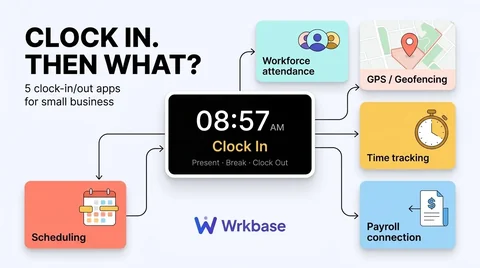
Know who's in, without anyone having to announce it.
- Free plan forever
- 14-day money-back guarantee
- Cancel anytime