Team chat softwareTalk where the work is.Find any answer by asking.
Wrkbase is team chat software built into your workspace: a company room, a separate activity feed, and private threads, all searchable in plain words.
- On every plan, including Free
- No card needed
- Working the same day
Chat
Team
Thanks both. Approving the pay run…
Activity
Priya Shah started a break.
Maya Chen
Done, sent.
Team
Everyone in the company
Maya Chen
September payroll review is on the board. Jordan, can you check the bonus lines?
Jordan Lee
On it, done before lunch.
👍 2Thanks both. Approving the pay run this afternoon.
Real conversation happens in Team, the company-wide room.
A chain of steps,replaced by one move.
The old way
- Open the chat app
- Scroll for the decision
- Ask "what did we agree?"
- Paste a link from the task app
The conversation lives in one tool and the work it is about lives in another.
With Wrkbase
What did we decide about the supplier?
Answered from your own messages, with the conversation it came from.
Sign-ins and task moves go to a separate Activity feed, so they never bury real conversation.
Start to finish,in plain steps.
- 1
Sign in, and it just gets logged
No status update to type. The Activity feed already has today's sign-in, and it'll pick up breaks and task moves the same way, without a single manual post.
- 2
Ask what's going on in Team, not hunt through DMs
One company-wide room is where anything meant for everyone actually happens, so there's no guessing which of five channels has the real conversation.
- 3
Move to a thread when it's not for the whole company
Direct and group threads exist for exactly that, without opening a separate app on the side to have the conversation.
- 4
Ask a question instead of scrolling for the answer
"What did we land on for the Chicago rollout" gets answered directly by AI-grounded search, scoped to whatever you could already see by scrolling yourself.
Careful by design,not by policy.
Status posts never crowd out people
A burst of sign-ins or task moves lands in Activity, not Team, so real discussion never has to scroll past a wall of automated messages.
Private when it needs to be
Direct and group threads exist for anything that genuinely isn't for the whole company, without leaving the product to open a separate messaging app.
Ask, don't search
AI-grounded search can answer a plain-language question about what was discussed, not just return a list of messages containing a keyword.
@mentions that actually notify
Mentioning someone in a task comment or a message notifies them directly, so nothing important depends on someone happening to scroll past it.
Everything in Team chat.The full list.
If it is not here, the product does not do it yet.
Conversations4
- A company-wide Team room
- Direct messages and groups of up to 50
- An Activity feed of sign-ins and task moves
- Unread badges, and a list or thread view on phones
Messages4
- Replies, reactions, and @mentions
- Up to 10 attachments, pasted images, and voice messages
- Delete your own messages
- Media, docs, and links collected per conversation
Search and AI3
- Keyword search across every conversation you’re in
- Ask AI: answers from past messages, with the sources
- Draft a task update from your own tasks in one click
Notifications3
- Mentions and direct messages notify you
- In-app, email, or browser push, your choice
- Sound and a toast for new Team messages
One record,shared with the rest of Wrkbase.
One database behind every module, so these happen without an export, a sync, or a second tool.
Every role seeswhat it should.
Boss
Posts anywhere and can delete anyone’s message in the Team room.
HR
Posts in the Team room, DMs, and groups; deletes their own messages.
Manager
Posts in the Team room, DMs, and groups; deletes their own messages.
Employee
Posts in the Team room, DMs, and groups; deletes their own messages.
Which plan
Every plan, including Free. Ask AI search is on Team and Enterprise.
What it does not do.
Better to know now than after you have moved your team in.
No voice or video calls.
Messages can’t be edited after sending.
No online status, typing indicators, or read receipts.
No guest or external users.
Worth knowing before you switch

Does Wrkbase chat include voice or video calls?
No calls. Chat is text plus voice messages you record and send in any conversation, built around keeping conversation next to the tasks and records it's about rather than replacing a calling tool.
Can AI search see private conversations I'm not part of?
No. AI-grounded search is scoped to the channels and threads you already have access to, the same permission boundary as browsing them manually, not a separate, broader index.
Is team chat included on every plan, including Free?
Yes. The company-wide room, direct and group threads, voice messages, the Activity feed, and keyword search are on every plan, including Free. Ask AI, the search that answers questions from past messages, uses the AI agent, so it's on Team and Enterprise.
How is the Activity feed different from the audit log?
They're unrelated systems. Activity is casual, everyday visibility, sign-ins and task moves shown as posts so people don't have to ask. The audit log is the separate, permission-gated compliance record of every action. Activity was never meant to serve as evidence.
Does this replace Slack or Microsoft Teams?
It can, for a team that wants conversation to live next to the tasks and attendance data it's actually about instead of in a separate app. See the fuller comparison for exactly where it does and doesn't match up.
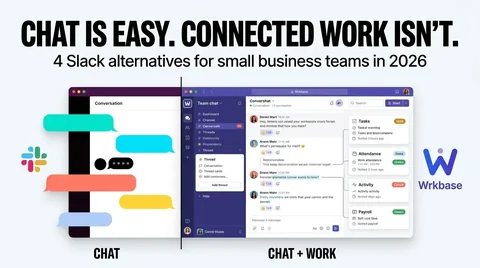
Conversation that stays conversation, not a status log.
- Free plan forever
- 14-day money-back guarantee
- Cancel anytime