Payroll tracking softwareDon't build the pay sheet.Just approve the run.
Wrkbase is payroll tracking software. It drafts the pay run from salaries or attendance hours; you adjust, approve, and everyone gets a payslip. You pay through your usual method.
- Included on Team
- Start free, upgrade later
- 14-day money-back guarantee
Sep 1 – Sep 30, 2026
Pay run · 4 employees
Draft: add bonuses, commission, or deductions, then approve.
A pay run starts as a Draft, one line per salaried employee.
A chain of steps,replaced by one move.
The old way
- Export the hours
- Open the spreadsheet
- Add bonuses
- Check the totals
- Email payslips
The same sheet is rebuilt every month, and one wrong cell pays someone the wrong amount.
With Wrkbase
Create the pay run for September
Draft ready, one line per employee. Approve it and payslips are generated.
Wrkbase does not move money or file tax. It keeps the record and the payslips.
Start to finish,in plain steps.
- 1
Set each salary once
Amount and currency per employee. A change is recorded in that person's employment history automatically, with the old and new values.
- 2
Generate the run for a period
One run per pay period, with a line for everyone who has a salary set. Anyone without a salary set is skipped.
- 3
Adjust while it's a Draft
Add a bonus, commission, or deduction and a note to any line. The base salary stays visible next to what was added on top.
- 4
Approve, then mark it paid
Approving locks the numbers and notifies each employee. Pay them through your bank or payroll processor, then mark the run paid: every line is recorded as paid, and employees are notified again.
- 5
Everyone gets a payslip
A payslip PDF per employee per run: base, bonus, commission, deductions, amount due, and amount paid. Employees see their own, admins see everyone.
Careful by design,not by policy.
Status comes from real payments
Unpaid, partial, and paid are derived from what was actually recorded, never a toggle flipped by hand.
A real approval step
Draft, Approved, then Paid, with line edits only while it is a Draft, so a mistake never slips straight through to payment.
Multi-currency, per employee
GBP, USD, EUR, BDT, INR, or PKR on each salary, so a distributed team is not forced onto one currency.
Everyone sees their own pay
Employees see their own salary, history, and payslips. Payroll admins see the whole company. No separate portal.
Everything in Payroll.The full list.
If it is not here, the product does not do it yet.
Salaries4
- Salary amount and currency per employee
- GBP, USD, EUR, BDT, INR, and PKR
- Salary changes logged to employment history
- Salary overview for the whole company
Pay runs4
- One run per pay period, generated from salary records
- Bonus, commission, deductions, and a note per line
- Draft, Approved, and Paid, with edits locked after approval
- Delete and regenerate a Draft
Hourly pay and overtime5
- Mark anyone as hourly, with a rate
- Hours from an approved timesheet, or the attendance clock
- Overtime past a daily threshold, at your multiplier
- Hours, rate, overtime, and multiplier kept on the payslip line
- Correct the hours while the run is a Draft
Payslips and notifications4
- Payslip PDF per employee per run
- Employees notified on approval and on payment
- Notifications in-app, by email, and by browser push
- Full payment history per employee
Payroll dashboard3
- Total monthly payroll, commission paid, upcoming payouts
- Change against the previous month
- 8-month payroll trend
One-off payments2
- Record a payment outside a run: amount due, amount paid, note
- Unpaid, partial, or paid status worked out from the amounts
AI agent and audit2
- Ask the AI agent to set a salary, record a payment, or mark a month paid, then confirm
- Every salary and pay-run change written to the audit log
One record,shared with the rest of Wrkbase.
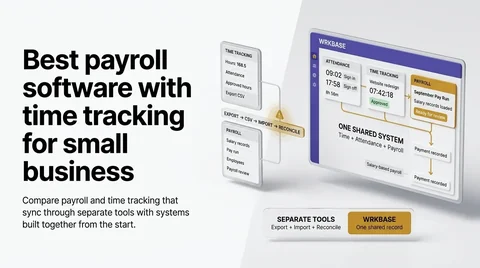
One database behind every module, so these happen without an export, a sync, or a second tool.
Every role seeswhat it should.
Boss
Everything: set salaries, create, approve, and pay runs, and see everyone’s pay.
HR
Set salaries, create, approve, and pay runs, and download anyone’s payslip.
Manager
Sees their own salary and payslips only. No access to anyone else’s pay.
Employee
Their own salary card, payment history, and payslips.
Which plan
Team and Enterprise. Not included on Free.
What it does not do.
Better to know now than after you have moved your team in.
Overtime is daily only, at one multiplier: no weekly thresholds, double time, or proration. Task hours and unpaid leave don't change pay.
No tax calculation, tax filing, or direct deposit. Pay through your usual method, then mark the run paid.
Deductions are one amount per line, not tax tables or benefit plans.
No payroll CSV export yet: payslips are per-employee PDFs.
Questions a small business actually asks

Is Wrkbase payroll tracking software or a payroll service?
Payroll tracking. Wrkbase generates each pay run from salary and hourly-rate records, lets you add bonuses, commission, and deductions, runs it through an approval step, and records what was paid, with a payslip PDF for every employee. It doesn't move money or file taxes: actual payment goes through your bank, your accountant, or a payroll processor, and gets marked paid here.
Does pay come from tracked hours or from salary?
Either, per person. A salaried person's line is their salary. An hourly person's line is their rate times their hours for the pay period, with breaks taken out: an approved timesheet's figure for any day it covers, and the attendance clock for the rest. Hours past your daily overtime threshold are paid at your multiplier, 1.5 times by default, and you can still correct the hours while the run is a Draft. Hours logged on tasks and approved leave sit on the same employee record for review but don't change the amount. If you need weekly or state overtime rules or tax filing worked out for you, a full payroll service such as Gusto or QuickBooks Payroll is the better fit.
So what does "payroll and timekeeping in one system" actually mean here?
That sign-ins, lateness, absences, approved leave, and task hours are recorded in the same workspace, on the same employee record, as salary and payslips. Checking a period before approving a run doesn't mean opening a separate time clock or exporting a timesheet. For anyone marked hourly, those attendance hours are also what the pay run multiplies by their rate.
Can employees see their own payslips?
Yes. Every employee sees their own salary, full payment history, and a payslip PDF for each run, and is notified when their pay is approved and again when it's marked paid. They never see anyone else's pay.
Can I fix a mistake after a pay run is approved?
Line edits are only allowed while a run is a Draft; a Draft can also be deleted and regenerated. Once Approved, the run's numbers are locked, so a correction goes in as a separate payment record rather than a silent edit to an approved run.
Does it support multiple currencies?
Yes. Each salary carries its own currency: GBP, USD, EUR, BDT, INR, or PKR. The payroll dashboard summarizes in whichever currency makes up most of that month's total.
How does this compare to Gusto or QuickBooks Payroll?
Gusto and QuickBooks both run payroll end to end, including tax filing, direct deposit, and state overtime rules, which Wrkbase doesn't do. Gusto's Simple plan starts at $49/month plus $6/employee, but time tracking only unlocks on the pricier Plus tier. QuickBooks Payroll and QuickBooks Time are synced since Intuit owns both, but Time requires an active QuickBooks Online subscription on top (Premium is $20/month plus $10/user, Elite $40/month plus $12/user, after a July 2026 price rise). Wrkbase is a different shape: salaried and hourly pay runs, attendance, time tracking, HR, and tasks in one workspace for $8 per member, sitting underneath a tax-filing service rather than replacing one.
Is there a minimum team size?
No. Free covers up to 5 people with no card required. Payroll unlocks on Team at $8 per member per month, whether that's 6 people or 50.
Run payroll from the same place the work happens.
Free to try with your real team, up to 5 people, no card needed.
- Free plan forever
- 14-day money-back guarantee
- Cancel anytime