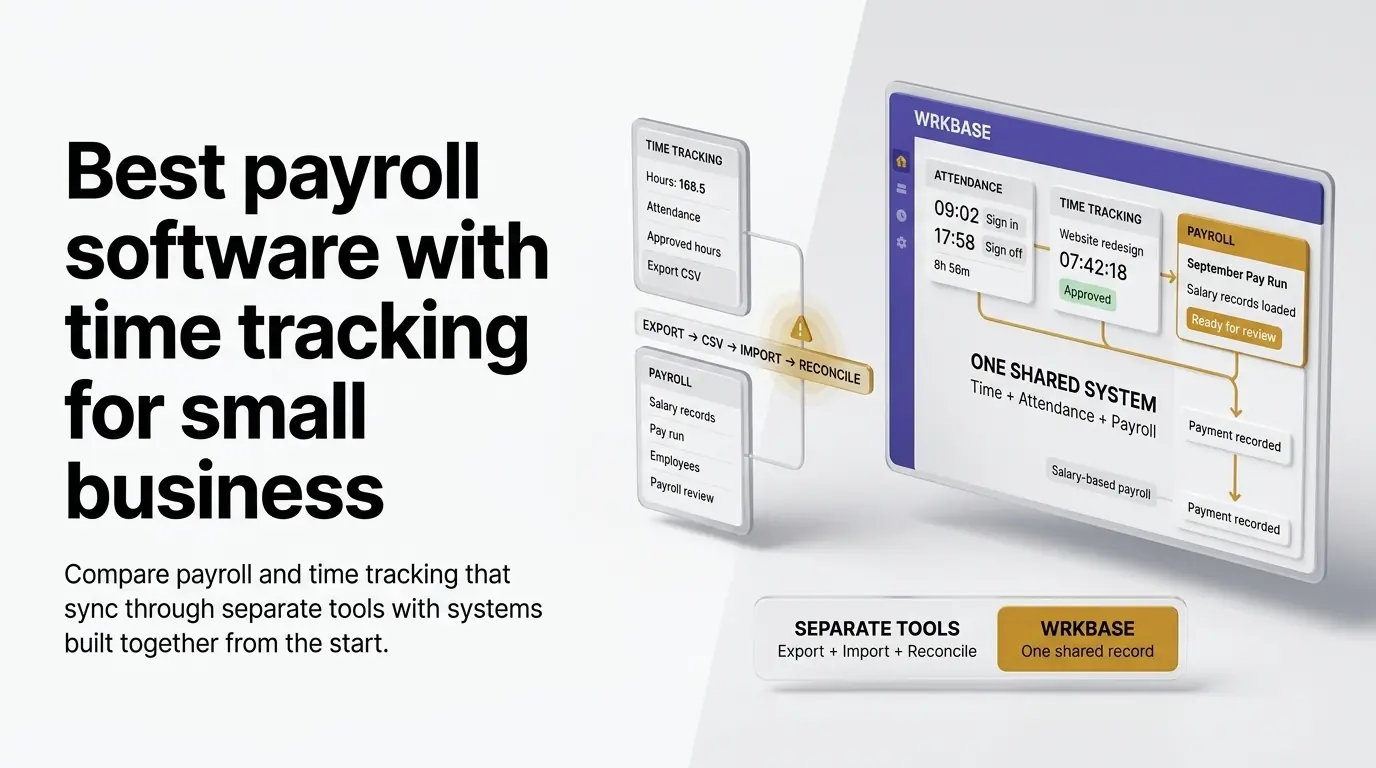
Short answer: if your team is paid by the hour, choose Gusto Plus, QuickBooks Time with QuickBooks Payroll, OnTheClock, or Buddy Punch with its payroll add-on. Each turns approved hours into pay and files taxes. If your team is salaried and you want payroll tracked next to attendance, time, and HR in one workspace, that is what Wrkbase payroll is built for. Full disclosure: we build Wrkbase, so its section says plainly what it doesn't do. Two narrower guides: timesheet to payroll software covers the handoff itself, and payroll and time clock software covers teams that punch in. To total one pay period before you commit to anything, try the free payroll tracker.
First question: does pay need to follow hours?
"Payroll software with time tracking" covers two different jobs. For an hourly team, approved timesheets have to become the paycheck every period, so what matters is how cleanly hours flow into the payroll calculation and whether taxes are filed for you. For a salaried team, hours don't change what anyone is paid, so what matters is seeing attendance, leave, and time next to each pay run without exporting anything. Most tools below are built for the first job. Wrkbase is built for the second, and also pays hourly staff their rate times their attendance hours, with daily overtime.
Gusto
Gusto is full-service payroll: it calculates pay, files taxes, and pays people by direct deposit. As listed in September 2026, Simple is $49/month plus $6/person, Plus is $80/month plus $12/person, and Premium is $180/month plus $22/person. Time tracking starts on Plus, so an hourly team that wants timesheets flowing into payroll is looking at Plus or above. It's the right fit when tax filing and hourly pay are the job; it doesn't run your tasks, HR letters, or leads.
Rippling
Rippling prices its base Unity platform at $8/employee/month (employee directory, onboarding, basic analytics) plus a mandatory flat platform fee reported around $35-40/month. That base price doesn't include payroll at all: payroll is a separate module typically adding $6-10/employee/month on top. Once payroll, time tracking, and any other modules are added, the effective per-employee cost commonly lands in the $23-38 range, per multiple 2026 pricing breakdowns. Rippling doesn't publish a single all-in price: every quote is custom, based on company size and modules selected. It's a powerful, deep HR/IT/payroll platform, built for a company that needs that breadth, not a small team wanting one predictable price.
Buddy Punch
Buddy Punch is a strong dedicated time clock: GPS, geofencing, kiosk punch-in, and webcam photos. Plans run $4.99 to $12.99 per user per month billed annually, plus a $19/month base fee. Payroll is a paid add-on at $8/user/month plus a $49/month base fee, with tax filing and direct deposit, per its pricing page in September 2026. For a field team that needs geofenced clock-ins and hourly payroll, it's more purpose-built than Wrkbase.
QuickBooks Time + QuickBooks Payroll
QuickBooks comes closer to real integration than most: because Intuit owns both products, hours approved in QuickBooks Time flow into QuickBooks Payroll without a manual export. The catch is QuickBooks Time isn't sold standalone, it requires an active QuickBooks Online subscription on top, and both Time tiers rose in July 2026 (Premium to $20/month plus $10/user, Elite to $40/month plus $12/user). Synced, but two products and two bills, not one system that was never two things to begin with.
OnTheClock
OnTheClock time tracking runs $4/employee/month plus a $5 monthly base fee (includes scheduling, PTO, GPS/geofencing). Payroll is a $6/paid-employee/month add-on plus a separate $40 monthly base fee, per OnTheClock's own pricing page as of September 2026. The same pattern as the others on this list: a capable time-clock tool with payroll bolted on as a second product and a second bill, not one system from the start.
Wrkbase
Wrkbase is one workspace where attendance, automatic task time tracking, leave, HR, and payroll share one employee record, so a pay period can be reviewed without a CSV or a second subscription. Payroll is on the Team plan at $8/member/month, which also includes the AI agent, leads, and invoicing; Free covers up to 5 people without payroll. It is payroll tracking: pay runs come from salaries, or an hourly rate times hours from a weekly timesheet. The timesheet fills in from the attendance clock and is approved by a manager, and overtime past a daily threshold is paid at your multiplier. Bonuses, commission, and deductions are added per line, the run goes through an approval step, and everyone gets a payslip. It doesn't apply weekly or state overtime rules, file taxes, or move money, so actual payment goes through your bank or payroll processor and is marked paid here.
Picking between these
For hourly teams that need tax filing: Gusto for full-service payroll, QuickBooks Time + Payroll if your books already run on QuickBooks. For field teams that need a strong time clock, Buddy Punch or OnTheClock. For a larger company that needs deep HR, IT, and payroll together, Rippling, at custom pricing. For a salaried team under 50 that wants payroll tracked next to attendance, time, HR, and tasks in one place, Wrkbase. Prices are as each vendor listed them in September 2026; confirm on their own pages before deciding.
Is a tool that doesn't have built-in payroll worth ruling out?
Not automatically, tools like MyHours are capable time trackers with no payroll feature at all, which is fine if payroll is already handled elsewhere and only the time-tracking half is being shopped for. It matters for this comparison because the question here is about the two working together. A tool that only does one half can't be judged on the integration angle at all, only on time tracking alone.
Does an all-in-one system save money over separate best-of-breed tools?
Sometimes, but it depends on what "best-of-breed" is being compared against, and the real savings are usually in time and error-reduction more than sticker price. Stitching together a dedicated time clock and a dedicated payroll tool can cost less per feature than an all-in-one. The trade-off is the export/import step between them, and the reconciliation work and error risk that step creates every pay period.
What is the best payroll software with time tracking for hourly employees?
If hours have to become the pay amount, pick a tool that calculates hourly pay and files taxes. That means Gusto Plus, QuickBooks Time with QuickBooks Payroll, OnTheClock with its payroll add-on, or Buddy Punch with its payroll add-on. Wrkbase pays hourly staff their rate times attendance hours, with daily overtime at one multiplier and no tax filing.
What is the best payroll tracking software for a salaried small team?
One that keeps salaries, approvals, and payslips next to attendance and time, so a pay period can be checked without exporting anything. Wrkbase does that for $8 per member per month, including attendance, time tracking, leave, and HR; payment and tax filing stay with your bank, accountant, or payroll processor.
Which payroll systems offer built-in time tracking?
Gusto includes time tracking from its Plus tier, QuickBooks Payroll pairs with QuickBooks Time, and OnTheClock and Buddy Punch are time clocks that sell payroll as an add-on. Wrkbase keeps the attendance clock, weekly timesheets, and payroll tracking in one workspace, but leaves tax filing and payment to your bank or processor.
What is the best way to sync time tracking with payroll?
Keep hours and pay in one record so there is nothing to sync, or use two products from one vendor that are built to share hours. An export file works, but it is the step where retyping and missed corrections creep in. Whichever you use, have a manager approve the hours before the pay run reads them.
Questions this post answers
What is the best payroll software with time tracking for hourly employees?
If hours have to become the pay amount, pick a tool that calculates hourly pay and files taxes. That means Gusto Plus, QuickBooks Time with QuickBooks Payroll, OnTheClock with its payroll add-on, or Buddy Punch with its payroll add-on. Wrkbase pays hourly staff their rate times attendance hours, with daily overtime at one multiplier and no tax filing.
What is the best payroll tracking software for a salaried small team?
One that keeps salaries, approvals, and payslips next to attendance and time, so a pay period can be checked without exporting anything. Wrkbase does that for $8 per member per month, including attendance, time tracking, leave, and HR; payment and tax filing stay with your bank, accountant, or payroll processor.
Is a tool that doesn't have built-in payroll worth ruling out?
Not automatically, tools like MyHours are capable time trackers with no payroll feature at all, which is fine if payroll is already handled elsewhere and only the time-tracking half is being shopped for. It matters for this specific comparison because the question being asked here is about the two working together, and a tool that only does one half of that can't be evaluated on the integration angle at all, only on time tracking alone.
Does an all-in-one system save money over separate best-of-breed tools?
Sometimes, but it depends on what "best-of-breed" is being compared against, and the real savings are usually in time and error-reduction more than sticker price. Stitching together a dedicated time clock and a dedicated payroll tool can cost less per feature than an all-in-one. The trade-off is the export/import step between them, and the reconciliation work and error risk that step creates every pay period.
Which payroll systems offer built-in time tracking?
Gusto includes time tracking from its Plus tier, QuickBooks Payroll pairs with QuickBooks Time, and OnTheClock and Buddy Punch are time clocks that sell payroll as an add-on. Wrkbase keeps the attendance clock, weekly timesheets, and payroll tracking in one workspace, but leaves tax filing and payment to your bank or processor.
What is the best way to sync time tracking with payroll?
Keep hours and pay in one record so there is nothing to sync, or use two products from one vendor that are built to share hours. An export file works, but it is the step where retyping and missed corrections creep in. Whichever you use, have a manager approve the hours before the pay run reads them.
Employee management software for small teams: tasks, time tracking, attendance, leave, payroll and HR in one place.
Start freeSee the paid time off someone earns each pay period and their balance today. No sign-up.
Open the calculator