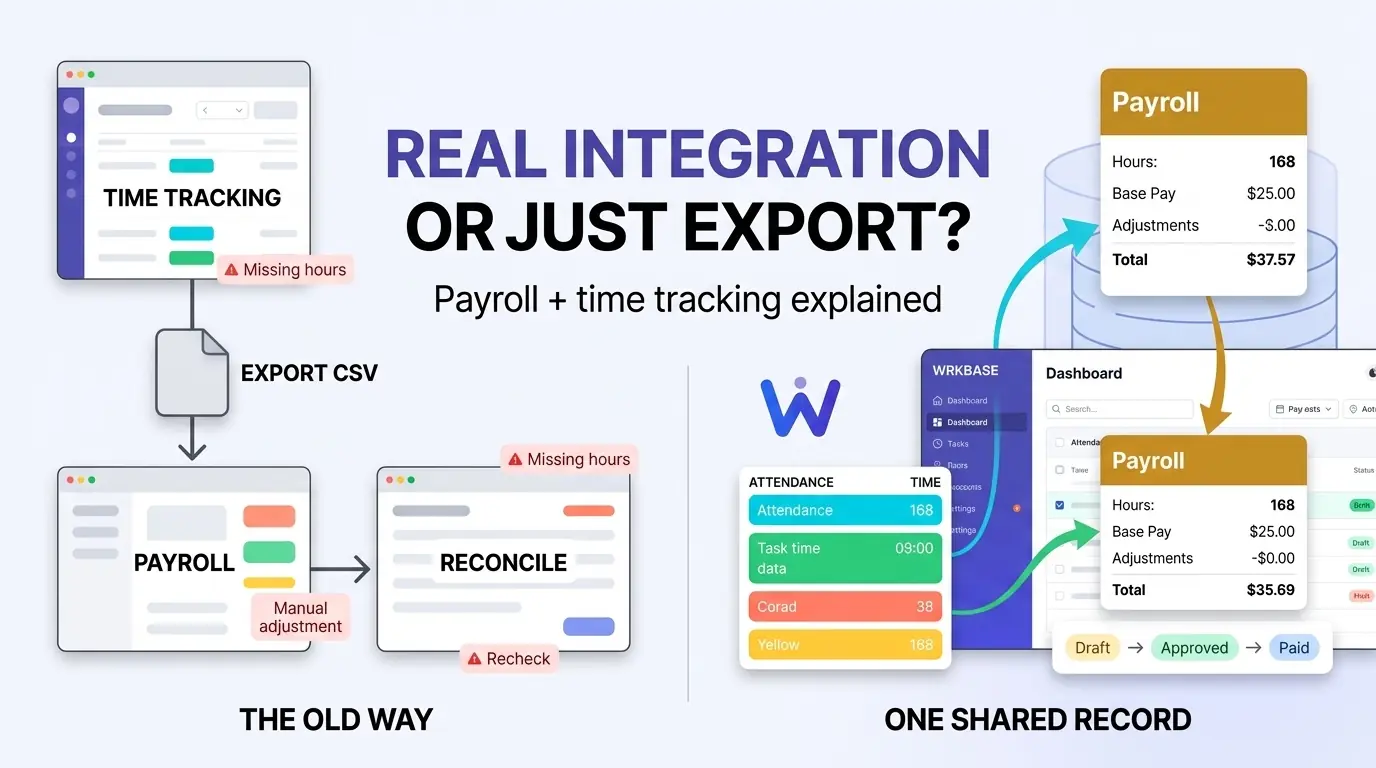
"Integration" is a word that gets stretched to cover a lot of ground. For a lot of payroll tools, it means an export button on the time-tracking side and an import button on the payroll side, two separate systems that agree with each other as long as someone remembers to run both steps correctly, every single pay period. That's not really integration, it's a manual reconciliation ritual with a nicer name. Before buying anything, run the five checks in payroll and timekeeping software.
For the main options side by side, with prices, see the best payroll software with time tracking for small business.
Two things "integration" can mean
First question: does pay depend on hours?
There are two different jobs hiding behind "payroll with time tracking." If your team is paid by the hour, approved hours have to become the pay amount every period, and the integration that matters is how cleanly hours flow into the payroll calculation. If your team is salaried, hours don't change what anyone is paid, and the integration that matters is simpler: can you see attendance, leave, and logged time next to pay without exporting anything? Wrkbase payroll is built for the second job. Pay runs are generated from salary records, and attendance, leave, and task hours live on the same employee record, because they're one system, not two products synced together.
What that prevents
For a salaried team, the familiar month-end chore, export attendance from one tool, cross-check it against a payroll spreadsheet, chase the two people whose leave never got recorded, mostly disappears, because attendance, approved leave, and the pay run are in one place. Payment status, paid, partial, unpaid, is always derived from actual payment records, and a pay run moves through Draft, Approved, then Paid, with line-item edits only allowed while still in Draft, so a mistake never slips straight through to payment.
How Gusto and QuickBooks handle this
Two of the most common answers to "payroll with time tracking" are worth naming directly. Gusto starts payroll at $49/month plus $6/employee on its Simple plan, but time tracking only unlocks on the higher-priced Plus tier. Run Gusto payroll with a separate time-tracking tool instead, and you're syncing two subscriptions through an integration, not reading one shared record.
QuickBooks comes closer: because Intuit owns both products, hours approved in QuickBooks Time flow into QuickBooks Payroll directly, no export step. The catch is that QuickBooks Time isn't sold standalone, it requires an active QuickBooks Online subscription on top, and both Time tiers rose in July 2026 (Premium to $20/month plus $10/user, Elite to $40/month plus $12/user). Two products, two bills, synced, and built for hourly pay, which Wrkbase doesn't calculate.
Adjustments stay visible, not silent
Real payroll always needs a manual override somewhere: a bonus, a one-off deduction, a correction. That's supported per person, per run, but every adjustment is its own recorded entry, not an edit that silently overwrites the computed base number, so what was computed and what was added on top of it both stay visible afterward.
What this integration does not do
Worth being direct about what Wrkbase doesn't do. Its hourly pay is a rate times attendance hours with daily overtime at one multiplier, and no weekly or state overtime rules. It doesn't file payroll taxes or move money either: actual payment still goes through a bank transfer, an accountant, or a payroll processor, and gets recorded here once it's done. Gusto and QuickBooks Payroll run payroll end to end, tax filing, direct deposit, and overtime rules included, which is real value if that's the actual job. Wrkbase fits a small team that wants attendance, leave, time, and pay runs in one system at $8 per member per month, and it can sit underneath a tax-filing service rather than replace one.
Free for up to 5 people
What is Wrkbase?
Employee management software for small teams: tasks, time tracking, attendance, leave, payroll and HR in one place.
Start freeFree PTO accrual calculator
See the paid time off someone earns each pay period and their balance today. No sign-up.
Summarize this post with AI

Written by Sakib Islam, founder of Wrkbase
Notes on how the product is actually built.
Next up
Task management vs. project management software