Remote team management softwareLead your team.Wrkbase shows the work.
Wrkbase is remote team management software that makes the work visible, not the person. Hours, attendance and status update themselves. No screenshots, no keystroke logs.
- Free plan forever
- No screenshots, ever
- No card needed
Tasks
Board
To do
2Prep September payroll review
Update onboarding docs
In progress
1Q4 hiring plan
In review
1Client onboarding deck
Completed
1Renew software licenses
A task waits in To do.
Built for teams like yours
- Distributed agencies
- Remote-first startups
- Hybrid offices
- Outsourcing teams
- Support teams
- Teams across time zones
- Free plan foreverUp to 5 people, no card
- Founder-led supportThe builder answers you
- Two-factor sign-inOn every plan
- 14-day money-backOn every paid plan
You hired people you trust. Stop chasing them for updates.
Managing by message
- Ask "where are you on this?"By hand
- Collect timesheetsBy hand
- Check who is onlineBy hand
- Hold a standup to catch upBy hand
- Scroll chat for a decisionBy hand
- Build the weekly reportBy hand
Who does itYou
With Wrkbase
- Status on every task cardAutomatic
- Timer runs with the taskAutomatic
- Live list of who is signed inAutomatic
- Activity feed posts itselfAutomatic
- Search chat in plain languageAutomatic
- Reports ready to downloadAutomatic
Your partReview and approve
Your whole team. One calm screen.
Every card shows who has it, how far along it is and how long it has run.
Tasks
Board
To do
2Prep September payroll review
Update onboarding docs
In progress
1Q4 hiring plan
In review
1Client onboarding deck
Completed
1Renew software licenses
A task waits in To do.
Wrkbase does the admin. You just say yes.
See the work, not the screen.
Task status tells you what is moving. Nothing in Wrkbase watches a screen, a mouse or a keyboard.
- No screenshots
- No keystroke logs
- No activity scores
Hours track themselves.
A timer starts when a task moves to In progress and stops when it leaves. Nobody fills in a timesheet.
- No start button to forget
- Time lands on the task
- Ready for reports and pay
Catch up in one question.
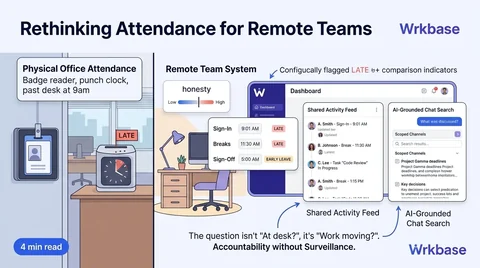
Sign-ins, breaks and task moves post to a shared feed. Ask the chat search what happened overnight.
- Works across time zones
- No standup needed
- Answers from your own chats
Chat
Team
Thanks both. Approving the pay run…
Activity
Priya Shah started a break.
Maya Chen
Done, sent.
Team
Everyone in the company
Maya Chen
September payroll review is on the board. Jordan, can you check the bonus lines?
Jordan Lee
On it, done before lunch.
👍 2Thanks both. Approving the pay run this afternoon.
Real conversation happens in Team, the company-wide room.
Two subscriptions, or one
What tasks, time tracking and attendance cost in separate tools, for your team size. Wrkbase's Team plan also covers HR, salary pay runs, leads, invoicing and the AI agent.
- ClickUp UnlimitedTasks
- $70.00
- Buddy Punch StarterTime clock and attendance
- $68.90
- Separate tools, per month
- $138.90
Wrkbase, per month
$66.70
Team plan, billed yearly
$866.40 less per year at list price.
List prices from each vendor's pricing page, billed annually, checked 3 October 2026. ClickUp and Buddy Punch each do things Wrkbase doesn't; this compares price for these three jobs only.
Built by one founder. Checked on every request.

Sakib Islam
Founder, Wrkbase
I write the code and answer every message myself. Ask whether Wrkbase fits your team and you get a straight answer, including when it does not.
Talk to SakibTwo-factor sign-in
Available on every plan, including Free.
Roles and permissions
Custom roles, checked on the server for every request.
A full audit log
Every change, by a person or the AI agent, is recorded.
Your data stays yours
Each organization is isolated from every other one.
Monitoring tools watch people. Wrkbase was built to show the work.
Specific, sourced facts against five tools teams actually switch from. Where another tool is the better pick, the table says so.
| Feature | This is usWrkbase$0 to $18 / member | HBHomebase$0 to $120 / location | BPBuddy Punch$4.99 to $12.99 / user | CUClickUp$7 to $12 / user | Mmonday.com$9 to $19 / seat | BHBambooHR$10 to $25 / staff |
|---|---|---|---|---|---|---|
| Everyday workWhat the team opens every day | ||||||
| Task board | Included | $13/mo add-on | Add-on, or Advanced tier | Included | Included | Not available |
| Time tracking | Included | Included | Included | Paid plans | Pro plan only | Paid add-on |
| Team chat | Included | From Essentials | Not available | Paid plans | Not listed | Not listed |
| PeopleAttendance, leave and HR | ||||||
| Attendance clock | Included | Included | Included | Not available | Not listed | Paid add-on |
| Leave requests and balances | Included | From Plus | Included | Not listed | Not listed | Included |
| HR onboarding and documents | Included | All-in-One plan | $4/user add-on | Not listed | Not listed | Included |
- Included
- Not available
- Not listed: not on that tool's pricing page
Competitor pricing and features as publicly listed, August to October 2026 (Homebase, Buddy Punch, ClickUp, monday.com, BambooHR). Pricing pages change. Confirm current numbers there before deciding.
Want the detail on one of them? Wrkbase vs Homebase, Wrkbase vs Buddy Punch, Wrkbase vs ClickUp, Wrkbase vs monday.com, Wrkbase vs BambooHR.
Start free. Pay when the team grows.
Stay on Free as long as it fits, and move up only when you need more.
Not sure which plan? Answer two quick questions.
Best fit: Free
Free
For small teams getting started.
$0/forever
No credit card required
Start freeFree includes
- Up to 5 members
- Tasks, time tracking & attendance
- Team chat, calendar & leave
- HR tools, reports & custom roles
Team
For growing teams that run payroll and performance in Wrkbase.
$8/member a month
Billed per member. Cancel anytime.
Start with TeamEverything in Free, plus
- Up to 50 members
- Payroll runs with overtime
- Timesheets & shift scheduling
- Performance scores, goals & reviews
- Leads pipeline & finance
- Automations, API & webhooks
- AI agent, 500 actions/mo
Enterprise
For organizations that need unlimited AI usage and dedicated support.
$18/member a month
Billed per member. Cancel anytime.
Start with EnterpriseEverything in Team, plus
- Unlimited members
- Everything in Team
- Unlimited AI agent actions
- Dedicated onboarding & support
Every plan includes tasks, time tracking, attendance, leave, team chat and two-factor sign-in. Payroll, Performance, AI agent, Leads pipeline, Finance & invoicing, Timesheets & overtime, Shift scheduling, Automations, API & webhooks are on Team and Enterprise. Paid plans come with a 14-day money-back guarantee. Compare all plans
Questions remote team leads ask.
Does "no surveillance" mean no accountability?
No. It's a different mechanism, not a weaker one: task status and a live Activity feed instead of screenshots. Distributed teams don't need less accountability than co-located ones, they need one that doesn't depend on someone being able to walk past a desk.
Does this actually work across many time zones?
Yes, that's the point of it. Visibility is status-driven, not synchronous-check-in-driven, so knowing who's working right now doesn't require everyone to be online at the same time.
Does removing surveillance mean we lose evidence for a real dispute?
No. Every action, on a task, an attendance record, an AI agent step, still writes to a separate, permission-gated audit log. What's gone is screenshots and keystroke logs, not the record of what actually happened.
Can we still see how many hours someone logged, just not watch their screen?
Yes. Time tracking still runs and still produces real hours, it's just a byproduct of a task status change someone was already making, not something derived from monitoring their screen while they work.
You lead a team.Not a surveillance desk.
- Free plan forever
- 14-day money-back guarantee
- Cancel anytime