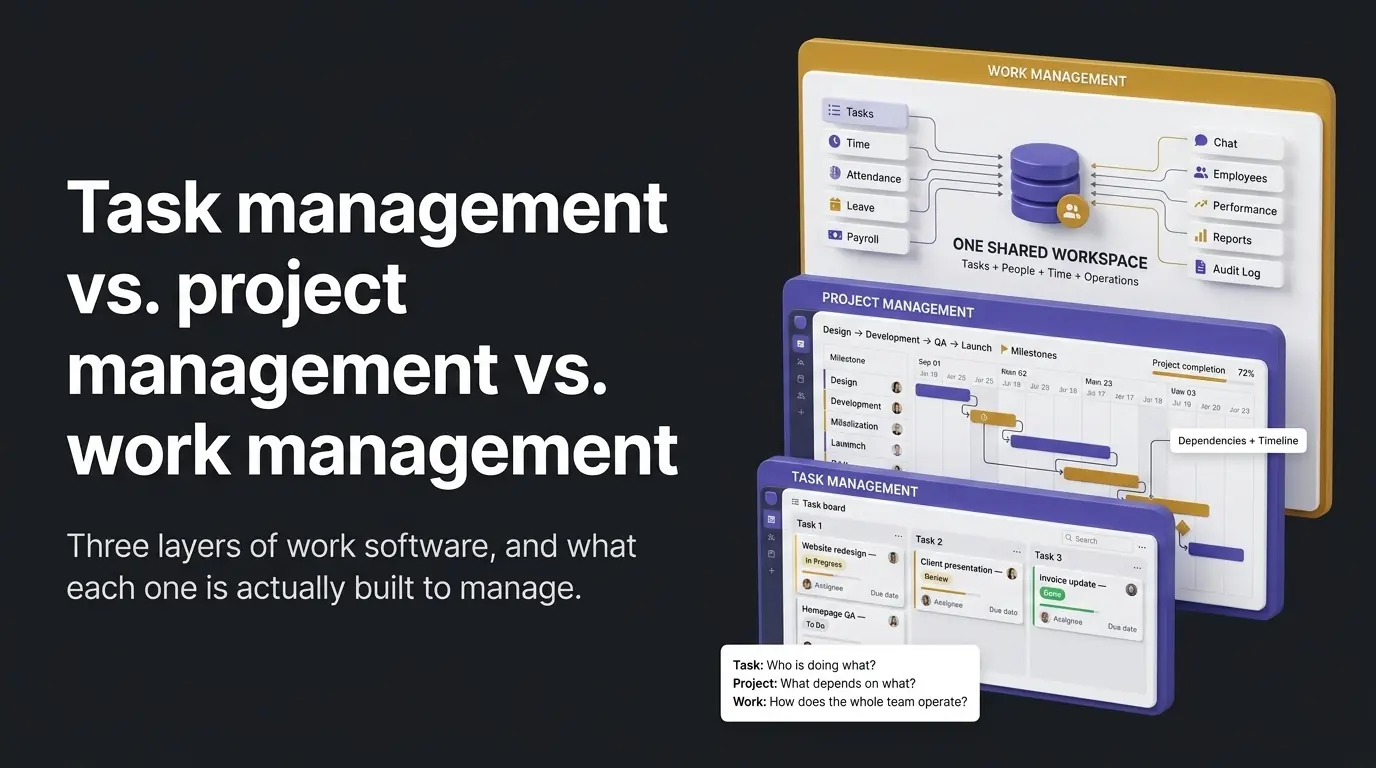
"Task management," "project management," and "work management" get used as if they're interchangeable in software marketing, and that overlap is exactly the confusion behind real searches comparing all three. They're not the same category of software, and the difference isn't semantic, it shows up directly in what each one is built to answer.
What each term is answering
Task management answers "who is doing what, and is it done." A board, an assignee, a status, a due date, nothing more than that.
Project management answers a bigger question: "when will this whole initiative finish, and what depends on what." That needs dependencies between tasks, timelines or Gantt-style views, and portfolios across multiple projects competing for the same people's hours. It's structure a day-to-day task board doesn't have and usually doesn't need.
Work management is the broadest of the three, and the least concretely defined in most vendor marketing. It's the layer covering a team's full set of ongoing operations, project-based or not, rather than just one initiative with a start and end date. In practice that means the same system also tracking time, attendance, leave, and payroll, not only planning work.
How the three nest
The three aren't competing options, they nest inside each other. Task management is the execution layer any project still comes down to at the ground level, assignees, statuses, due dates, regardless of how much planning structure sits above it. Project management adds a coordination layer on top, for work that has real cross-task dependencies and a finish line. Work management sits above both. A team can need task management without ever needing project management: most small teams never run a multi-month initiative with dependencies between tasks. But the moment that same team also wants attendance, payroll, or leave running through the same system as its tasks, that's the work-management layer. It has nothing to do with whether any single project has dependencies.
Where Wrkbase sits
Wrkbase is work management, not project management, and the evidence for that is architectural, not a marketing label. It is 20 modules on one shared database: tasks, time tracking, team chat, a shared calendar, announcements, automations, an AI agent, employee records, HR tools, attendance, shift scheduling, timesheets, leave, payroll, performance, leads, finance, reports, an audit log, and an API. All of them read from the same record instead of syncing between separate tools.
The clearest concrete example is payroll: a pay run is generated from each person's salary record, or for hourly staff from their approved timesheet hours. The same attendance data (late arrivals, missed clock-outs, logged hours) sits right alongside it on the same record. There is no export-then-import step between a separate time-tracking tool and a separate payroll product. That's the actual mechanism "work management" is describing, once it isn't just marketing language anymore.
What Wrkbase honestly doesn't do
On the task-management side: no dependencies between tasks, no Gantt or timeline views, no portfolio view across multiple projects. If a multi-week initiative with cross-task dependencies is the actual requirement, a dedicated project-management tool like ClickUp is the stronger fit for that specific job.
On the work-management side: Wrkbase isn't a replacement for a mature HRIS or ERP system. SSO doesn't exist yet for any tier (custom roles do), there's no on-prem deployment option, and it's opinionated about the workflow rather than a toolkit assembled to match an existing process. It's built for a small, growing team's day-to-day operations, not enterprise HR or ERP scale.
A 3-question way to tell which one you need
Three questions settle it faster than a feature list. First: does the work involve multiple people's tasks depending on each other finishing in order, or does anyone need a timeline view of a multi-week initiative? That's project management. Second: is it just "who's doing what, is it done," nothing more? Task management covers that on its own, no extra layer needed. Third: does the same team also need attendance, payroll, or leave to agree with the task board, without a manual reconciliation step at the end of the month? That's work management, and it's the question the other two categories never ask.
Answer yes only to the third question, a work-management system, Wrkbase included, is the actual fit. Answer yes to the first, a dedicated project-management tool is worth the switch even if it costs more setup structure. Most small teams are safer starting on the simpler tool and moving up only once the dependency problem is real, not anticipated.
Is task management part of project management?
Functionally, yes, task management is the execution layer any project-management tool still needs underneath its dependencies and timelines. The reverse isn't true: plenty of teams run task management with no project-management layer above it at all, because they never have multiple tasks depending on each other across a multi-week initiative.
Do I need project management software if I already have task management?
Only if the actual bottleneck is coordinating dependencies across a multi-person, multi-week initiative, not just tracking who's doing what this week. If that's not a real, current problem, adding a project-management layer on top of a task board usually adds structure nobody uses rather than solving anything.
Is Wrkbase a project management tool or a work management tool?
Work management, not project management, worth being direct about rather than blurring the line the way most vendor comparisons do. The task board has no dependencies, Gantt charts, or portfolio views; what it has instead is tasks, time, attendance, payroll, and chat agreeing with each other in one system.
Questions this post answers
Is task management part of project management?
Functionally, yes, task management is the execution layer any project-management tool still needs underneath its dependencies and timelines. The reverse isn't true: plenty of teams run task management with no project-management layer above it at all, because they never have multiple tasks depending on each other across a multi-week initiative.
Do I need project management software if I already have task management?
Only if the actual bottleneck is coordinating dependencies across a multi-person, multi-week initiative, not just tracking who's doing what this week. If that's not a real, current problem, adding a project-management layer on top of a task board usually adds structure nobody uses rather than solving anything.
Is Wrkbase a project management tool or a work management tool?
Work management, not project management, worth being direct about rather than blurring the line the way most vendor comparisons do. The task board has no dependencies, Gantt charts, or portfolio views; what it has instead is tasks, time, attendance, payroll, and chat agreeing with each other in one system.
Employee management software for small teams: tasks, time tracking, attendance, leave, payroll and HR in one place.
Start freeSee the paid time off someone earns each pay period and their balance today. No sign-up.
Open the calculator