Short answer on Homebase alternatives: if you want shift scheduling like Homebase at a similar price, look at When I Work or Connecteam. If you want a stronger punch clock, look at Buddy Punch. If you mainly want hours logged, Clockify is the cheapest. And if scheduling is only one part of what you run, Wrkbase puts attendance, timesheets, tasks, leave and payroll records in one workspace. Full disclosure: we build Wrkbase, and the last section says plainly when it is not the right pick.
Why teams look for Homebase alternatives
Homebase charges per location: $0, $30, $70 or $120 per location per month, as listed in August 2026, whatever the staff count. That is cheap for one busy site and climbs with every extra location: 10 people split across three locations on Essentials is $90 a month.
Several things sit above the free tier. Advanced scheduling and team communication start at Essentials, and the AI scheduling assistant is on Plus at $70 per location. Payroll is an add-on at a $49 monthly base fee plus $6 per employee paid, and the Task Manager is a $13 per location add-on. None of that is a flaw. It does mean the headline price and the bill for a team that wants scheduling, chat, tasks and payroll are different numbers, which is the usual reason people compare Homebase alternatives. The plan-by-plan detail is in Homebase pricing.
What 10 people cost on each tool
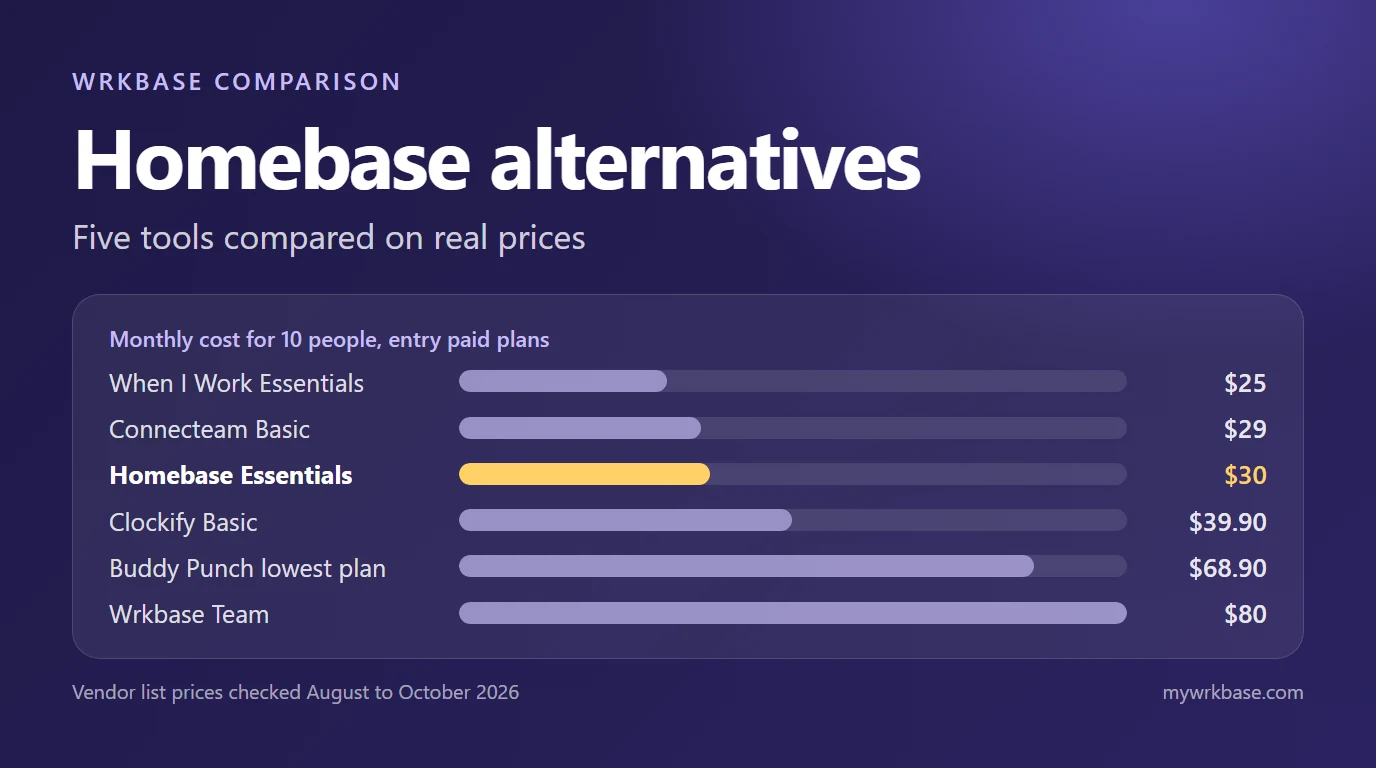
Monthly cost for 10 people at one location on each tool's entry paid plan, before any payroll add-on, worked out from the prices each vendor lists. Dates are when we last checked each page; confirm before you decide.
| Tool | Plan | 10 people, one location | Prices checked |
|---|---|---|---|
| Homebase | Basic (free, up to 10 staff) | $0 | August 2026 |
| Homebase | Essentials | $30 | August 2026 |
| When I Work | Essentials ($2.50 per user) | $25 | 9 October 2026 |
| Connecteam | Small Business (free, up to 10 users) | $0 | October 2026 |
| Connecteam | Basic (includes first 30 users) | $29 | October 2026 |
| Clockify | Basic ($3.99 per user, yearly) | $39.90 | October 2026 |
| Buddy Punch | Lowest plan ($4.99 per user + $19 base) | $68.90 | September 2026 |
| Wrkbase | Team ($8 per member; free up to 5) | $80 | Current |
When I Work: closest on scheduling
When I Work charges per user at $2.50, $5 or $8 a month, with no free plan and a 14-day trial. Auto scheduling, templates, multi-location scheduling, open shifts and shift swapping are on its lowest plan, and in-app team messaging is on every plan. Time tracking and attendance is an option, and its price was not shown when we checked. It is the nearest like-for-like swap for a team that mostly wants a rota, and it gets cheaper than Homebase as locations multiply. The head-to-head is in Homebase vs When I Work.
Connecteam: flat fee, mobile-first
Connecteam lists a free plan for up to 10 users, then Operations plans at $29, $49 or $99 a month that already include the first 30 users, and a small charge per extra user after that. GPS clock in and out starts at Basic, and open shifts are on the Basic scheduling. For a deskless team of up to 30 the flat fee is hard to beat; see Connecteam pricing for the full table.
Buddy Punch and Clockify: clock first
Buddy Punch is a per-person time clock: GPS on every plan, geofencing, kiosk and webcam photos from Pro at $6.99 per user, a $19 base fee, and no free plan. It suits crews working at different sites, and it is the dearest option at 10 people in the table above. Clockify is a timer first: free for up to 5 users, with timesheet approval from Standard and scheduling and GPS from Pro. It does no payroll of its own. If the time clock is the thing you are replacing, clock in clock out apps for small business lines them up.
Where Wrkbase is and is not an alternative
Wrkbase is not a shift-first tool. Its shift scheduling is a weekly rota you build, copy from last week and publish, with no open shifts, shift swaps or register integration, and it does not file payroll taxes. If a till-side clock or shift marketplace is the requirement, pick one of the tools above. It is an alternative when the rota is one part of a wider job: attendance with a phone clock, timesheets with overtime, tasks, leave, team chat and payroll tracking are in one workspace. It is free for up to 5 people and $8 per member per month on Team, which is the plan that includes scheduling and costs more than most of the tools above at 10 people. The line-by-line version is on Wrkbase vs Homebase.
Questions this post answers
What is the best free Homebase alternative?
It depends on what you need free. Connecteam lists a Small Business plan as free for up to 10 users. Clockify is free for up to 5 users but covers basic time tracking only. Wrkbase is free for up to 5 people. Homebase's own Basic tier is free for one location with up to 10 staff.
Is When I Work cheaper than Homebase?
At 10 people at one location, When I Work Essentials is $25 a month and Homebase Essentials is $30. At 20 people on one site, When I Work Essentials is $50 and Homebase Essentials is still $30. Split across three locations, Homebase Essentials is $90 for 10 people.
Which Homebase alternative includes payroll?
None of the tools here puts payroll in a base plan. Buddy Punch sells it as an add-on, When I Work lists payroll integrations, and Clockify's reports feed an outside payroll system. Wrkbase tracks payroll from attendance hours but does not file payroll taxes.
Employee management software for small teams: tasks, time tracking, attendance, leave, payroll and HR in one place.
Start freeSee the paid time off someone earns each pay period and their balance today. No sign-up.
Open the calculator